AI ad creative generator for still images
Create a square or wide visual concept from a truthful brief, reserve space for approved copy, and review every product detail, claim, and mark before the image enters a real campaign workflow.
Kanvora does not create ad accounts, manage campaigns, publish to Facebook or Google, predict performance, verify platform approval, or produce evidence for a marketing claim.
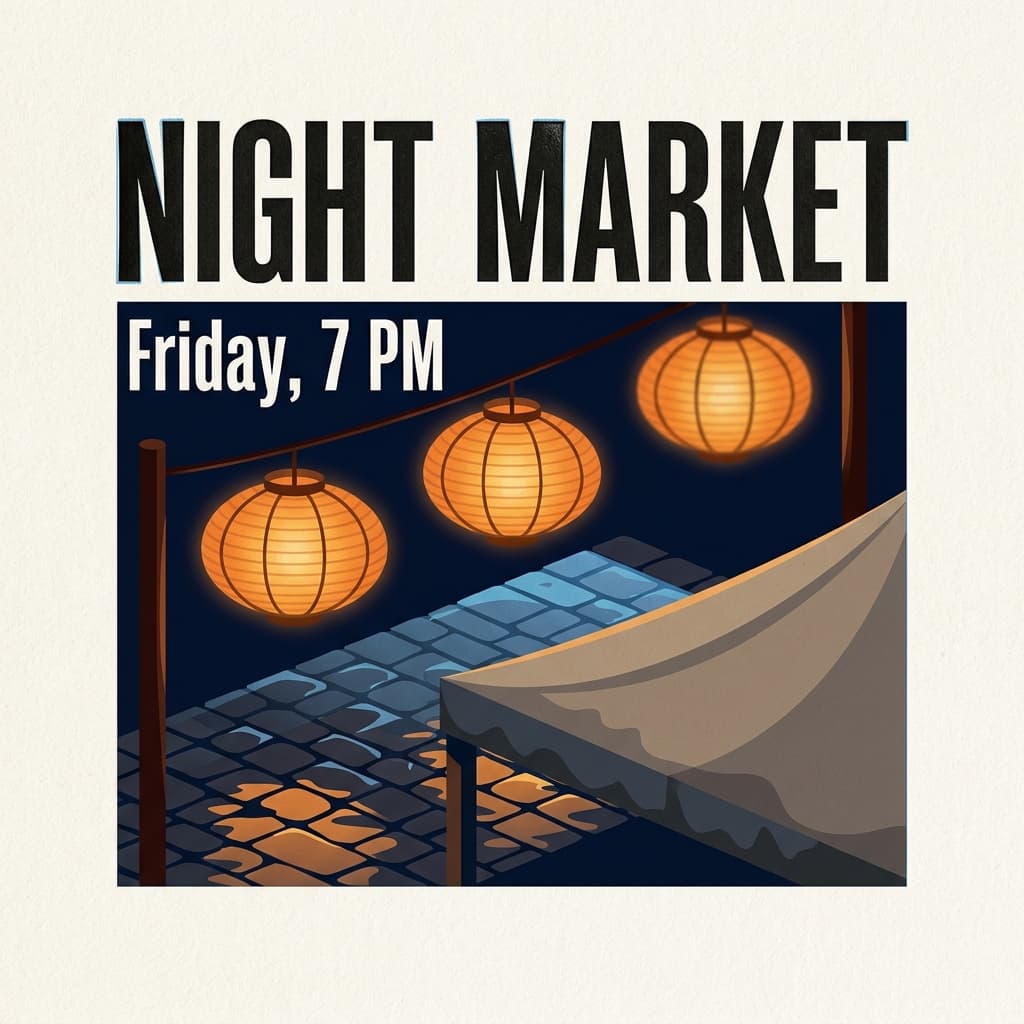 AI-generated · Kanvora official
Create a square event poster printed on warm cotton paper, 1:1. Headline text (exact): "NIGHT MARKET" Subhead text (exact): "Friday, 7 PM" Those two lines only, condensed gothic, carbon black, perfectly spelled, large headline filling the upper third. Visual subject: three oiled rice-paper lanterns on thin bamboo ribs hanging above an evening market street; wet dark-granite cobblestones; one canvas stall canopy edge in the lower third, rain-dark at the hem. Style: bold flat illustration with crisp geometric shapes, letterpress bite in the type, slight ink squash on the N and M, one faint registration hairline, visible cotton-paper tooth. Light: deep navy night sky, warm 2200K lantern glow pooling on the street, a thin cool skylight raking the wet stone, no extra neon signs. Atmosphere: a light rain sheen on the cobbles; no fog that hides the type; no people; no steam. Lens: straight-on poster camera, generous empty margins, type sharp, lanterns slightly softer. Must include: only those two exact lines of type, readable hierarchy, paper tooth, lanterns, wet stone. Must avoid: extra words, sponsor logos, watermarks, QR codes, people, tiny paragraph text, fake dates, signatures, stamps.
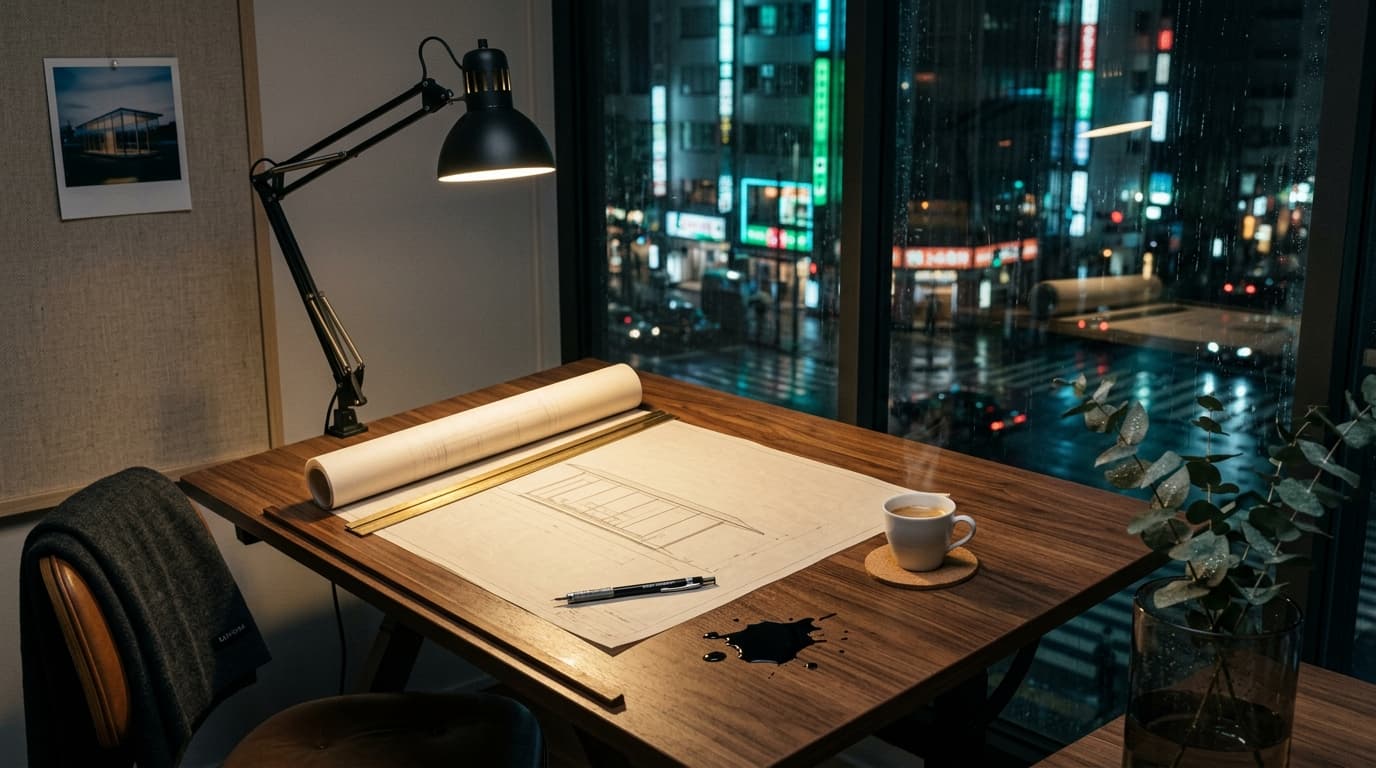 AI-generated · Kanvora official
A wide cinematic product still of a midnight architecture studio overlooking a rain-wet Tokyo side street. Center: a walnut drafting table with a large sheet of cream tracing paper, a brass parallel rule, a mechanical pencil, and a half-unrolled blueprint of a slender glass pavilion; a single espresso in a thin porcelain cup sits on a cork coaster, steam catching the light. Left: a blackened-steel desk lamp throwing a warm 2700K pool across the paper, specular highlights on the brass fittings and on a small pool of spilled ink that has not yet soaked in. Right: floor-to-ceiling glass, cool cyan-green city bounce, rain streaks, bokeh from distant neon and wet asphalt reflections. Mid-ground: a linen pinboard with a single Polaroid of the same pavilion at dusk, and a folded charcoal merino throw over the chair back, the word KANVORA embroidered in small graphite caps, slightly out of focus but readable. Foreground: a shallow-focus sprig of eucalyptus in a smoked-glass cylinder, tiny water beads on the leaves. 35mm look, f/2.0 falloff, rich wood grain, paper tooth, metal micro-scratches, no extra people, no watermark, no logo bug. Photoreal, quiet luxury, generous negative space in the upper third of the frame.
Use the diagram as a review guide
Reserve an editable copy zone and keep the image honest about what it shows.
Separate the offer, evidence, and visual idea
A compelling image cannot make an unsupported marketing claim true.
Write the real offer and approved claim first, then choose one visual idea that does not imply more. Record who owns substantiation and where exact copy will be added. Keep performance expectations out of the image-generation brief.
- Offer: the real product, service, event, or content the ad points to.
- Approved claim: exact language already supported by the responsible business owner.
- Evidence boundary: what the image can show and what it cannot prove.
- Visual idea: one subject or contrast that supports attention without fabricating an outcome.
- Placement: square 1:1 or wide 16:9, with one reserved editable copy zone.
- Exclusions: invented badges, prices, testimonials, before-and-after results, logos, platform UI, and watermarks.
Write a claim-safe visual brief
The prompt should create the scene, not invent the advertising proof around it.
Keep approved copy in a separate record and ask Kanvora for the visual layer. This makes wording editable and reduces the risk of fabricated prices, endorsements, labels, or results appearing inside the raster.
Offer: [real product, service, event, or content]
Approved message: [one truthful communication goal, not a generated claim]
Visual subject: [one scene or object]
Composition: [1:1 | 16:9], subject on [left | right | center], reserved copy zone [location]
Visual treatment: [light, palette, material, style]
Evidence boundary: image is illustrative and must not imply [unsupported result]
Must avoid: prices, testimonials, badges, before-and-after results, logos, platform UI, tiny text, watermarksCommunity repair-night still
This example demonstrates input structure only. Replace every detail with a brief you are allowed to use.
Offer: a real community repair night with registration handled on the event page
Approved message: bring one broken household item and learn with volunteer fixers
Visual subject: one open toolbox beside a small table lamp being inspected
Composition: wide 16:9, objects on the right, quiet dark copy zone on the left
Visual treatment: warm workshop photograph with crisp practical detail and restrained color
Evidence boundary: illustrative event image, not a promise that every item can be repaired
Must avoid: prices, success rates, testimonials, people, logos, platform UI, text, watermarks
Choose square or wide by the real placement
A still ad needs a known destination and an editable copy zone before generation.
Use 1:1 when the placement is square and 16:9 when a wide frame is required. Do not infer current platform specifications from this guide. Confirm the destination and required safe areas in the ad platform.
| Need | Choose | Check before generating |
|---|---|---|
| Square still placement | 1:1 | Keep the subject clear at small size and reserve one compact copy zone. |
| Wide still placement | 16:9 | Use one side for the subject and the other for exact editable copy. |
| Fast composition check | Nano Banana 2 1K, 4 credits | Judge focal hierarchy and copy space before choosing a larger Nano Banana 2 output. |
| Larger stored still | Seedream 5.0 Lite 2K at 3 credits or Nano Banana 2 2K at 5 | Choose by model and workflow need, not by a performance assumption. |
| Campaign and platform approval | Outside Kanvora | Verify destination rules, disclosures, targeting, and approval in the actual ad system. |
No ratio, model, or output size predicts conversion, approval, reach, click-through rate, or return on ad spend.
Create a still ad visual with claim controls
The workflow requires an approved message before generation and a real campaign review after it.
Treat the stored image as one creative input. The business remains responsible for claims, rights, disclosures, destination rules, and campaign decisions.
- 1
Approve the offer and message
Record the real offer, exact approved claim, evidence owner, disclosures, and what the image must not imply.
ContinueThe message is supported before any visual is generated.Stop or reviseThe claim lacks an owner, source, or necessary qualification. - 2
Build the visual-only brief
Describe one subject, the square or wide composition, treatment, copy zone, evidence boundary, and exclusions.
ContinueThe image can support the message without containing invented copy or proof.Stop or reviseMove prices, testimonials, badges, legal text, and precise product labels into controlled layout. - 3
Choose the frame, model, and budget
Select 1:1 or 16:9 and confirm the displayed 3, 4, or 5-credit attempt cost.
ContinueThe setting matches a known placement and pre-set creative budget.Stop or reviseDo not generate for an unknown destination or under an implied performance guarantee. - 4
Sign in, submit once, and settle the queue
Generate image gates guests at sign-in. Follow the one submitted job and wait if provider status becomes UNKNOWN.
ContinueA stored still or definite terminal result settles the credit hold.Stop or reviseDo not duplicate a QUEUED, RUNNING, or UNKNOWN request. - 5
Review claims, rights, and destination fit
Inspect the raster for invented text, outcomes, product details, marks, people, and any implication beyond the approved message.
ContinueThe visual is truthful, authorized, editable in the next tool, and suitable for destination review.Stop or reviseReject deceptive, unsupported, unowned, or platform-incompatible creative.
Reject an ad image that invents a success claim
The rehearsal shows how a visually appealing detail can create a material advertising risk.
A synthetic output must be checked for implied claims, not only explicit text. Objects, badges, and before-and-after structures can all overstate what the offer provides.
Community repair-night ad rehearsal
Fix the failed claim or composition at its source
Do not polish a risky image and hope the risk becomes less visible.
Reject unsupported implications first. Then preserve passing visual choices while revising one claim boundary, subject, copy zone, or composition field.
- Unsupported badge or result
- Reject the image, document the implication, and explicitly exclude percentages, guarantees, awards, and before-and-after outcomes.
- Product detail is invented
- Do not use the still as a product representation. Return to a concept-only brief or use a real product photo.
- No room for approved copy
- Move the subject to one side, simplify the background, and reserve one high-contrast editable zone.
- Generated copy is wrong
- Remove embedded words and add exact approved copy in the campaign layout.
- Unowned person or logo appears
- Reject the image, remove identity references, and regenerate. Rights review still applies to the next result.
- Queue status is UNKNOWN
- Wait for reconciliation. A duplicate request can create extra work and another credit hold.
Budget creative rounds without inventing ROI
Credit cost is known; campaign performance is not.
Set a fixed number of meaningful visual rounds and define pass checks before generation. Kanvora can state the integer cost of each attempt, but it cannot forecast approval, clicks, conversions, revenue, or return on ad spend.
| Model setting | Credits per attempt | Use when |
|---|---|---|
| Seedream 5.0 Lite 2K | 3 | You want the lowest current credit cost and a 2K still. |
| Seedream 4.5 2K | 4 | You need Seedream 4.5 text-to-image at its fixed live output. |
| Nano Banana 2 1K | 4 | You want the Kanvora default and 1K is enough for the review round. |
| Nano Banana 2 2K | 5 | You need Nano Banana 2 at the larger live output setting. |
| Seedream 5.0 Pro 1K | 6 | You need the flagship Seedream text-to-image path at its fixed live size. |
The 20-credit signup grant and one-time packs fund generation attempts only. Campaign media spend, setup, measurement, optimization, and platform fees are separate and outside Kanvora.
Hand the approved still to a real campaign workflow
The image-generation task ends before platform setup, targeting, publishing, and measurement.
Keep a still only when claim, evidence, rights, crop, and visible-detail checks pass. Then add exact approved copy and disclosures in the controlled layout and validate the final asset in the destination platform.
- Generate the visual
- The offer and claim are approved, and one still-image concept can support them truthfully.
- Revise the visual
- Subject, composition, copy zone, or a correctable claim boundary failed.
- Wait for the current job
- The request is active or UNKNOWN and should not be duplicated.
- Reject and escalate
- The image implies an unsupported outcome, includes an unowned identity, or misrepresents a real product.
- Use campaign tools
- The still passes and now needs exact copy, disclosures, platform approval, targeting, publishing, and measurement.
- Keep the current proof
- The approved still closes the visual task. More generation does not establish better performance.
Final review checklist
- The offer and every explicit or implied claim have a responsible evidence owner.
- No invented price, testimonial, badge, percentage, result, or product detail appears.
- The frame and copy zone fit the real destination review.
- Exact copy, disclosures, rights, approval, targeting, and measurement are assigned outside Kanvora.
- The stored still and review record download before campaign handoff.
Sources and review date
Model, product, queue, and credit facts can change and should be checked after the review date.
Kanvora's live generator and registry establish only models, ratios, output settings, and credit costs. They do not establish advertising substantiation, platform approval, audience fit, or performance. The page therefore keeps claim evidence and campaign operations outside the generation promise.
- Google AI: Nano Banana 2 API image generation documentation.
- ByteDance: Seedream 5.0 Lite model page.
- fal: Seedream 5.0 Lite text-to-image endpoint and Seedream 4.5 text-to-image endpoint.
- Kanvora: Live generator, pricing, Acceptable Use Policy, Terms, and Privacy.
Last verified: August 20, 2026. Frozen PAP review due: November 20, 2026.
Generate the still. Prove the claim elsewhere.
Open Kanvora's public generator, choose a square or wide frame, and sign in only after the offer, evidence boundary, and visual brief are ready.