Seedream 5.0 Pro
Choose Pro for complex visual instructions, dense information, multilingual layouts, reference-sensitive edits, and polished imagery where small decisions carry more weight.
Explore Seedream 5.0 ProTurn a rough idea, reference image, or detailed creative brief into a visual you can actually use. Create with Seedream 5.0 Pro or Lite for structured graphics, controlled edits, multilingual layouts, product concepts, and realistic scenes—all from one private online workspace.
20 FREE CREDITS ON SIGNUP · NO CREDIT CARD
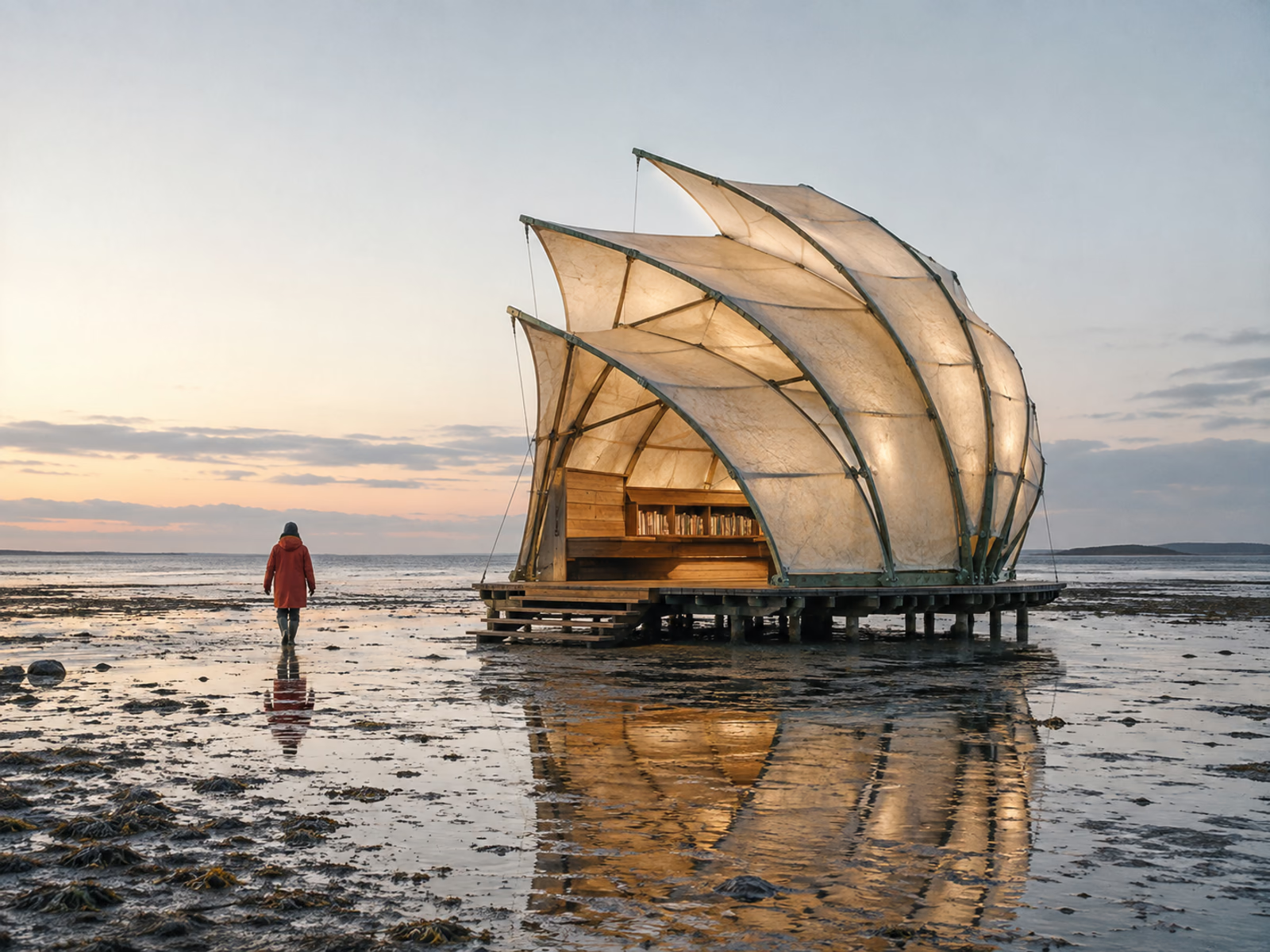
Create a 4:3 editorial key visual of a buildable translucent reading pavilion on a coastal salt flat just before sunrise. Use oxidized-copper ribs, mineral-fiber panels, shallow reflections, one distant visitor in an ember raincoat, believable dawn light, and quiet negative space at upper left; no text, logos, sci-fi effects, or mockup frame.
Create a 4:3 editorial key visual of a buildable translucent reading pavilion on a coastal salt flat just before sunrise. Use oxidized-copper ribs, mineral-fiber panels, shallow reflections, one distant visitor in an ember raincoat, believable dawn light, and quiet negative space at upper left; no text, logos, sci-fi effects, or mockup frame.
Seedream 5.0 is ByteDance Seed’s multimodal image model family for generating and editing images from written instructions and visual references. Pro fits dense, reference-sensitive work moving toward final delivery, while Lite fits faster visual exploration and lower-credit iteration.
Choose Pro for complex visual instructions, dense information, multilingual layouts, reference-sensitive edits, and polished imagery where small decisions carry more weight.
Explore Seedream 5.0 ProChoose Lite for fast concept development, broad visual exploration, reasoning-led briefs, and iterative work where you want to test more directions before refining.
Explore Seedream 5.0 LiteA polished image alone does not tell you whether a model understood the job. Each example below keeps a short goal, prompt, and output together so you can see what to ask for and what to improve.
CASE 01 · INFORMATION DESIGN
Create an educational infographic that explains the water cycle at a glance, then reveals the details in a clear sequence.

Create a 4:3 museum-style water-cycle infographic with a central landscape cutaway. Show four clear numbered stages: Evaporation, Condensation, Precipitation, and Collection, plus Transpiration and Groundwater as supporting paths; use large labels, accurate arrows, warm paper, mineral blue, slate, sand, and forest green.
CASE 02 · REFERENCE-GUIDED EDIT
Turn a clean product photograph into a seasonal campaign visual without losing its recognizable shape, material, or label area.


Use Image 1 as the bottle reference. Preserve its exact silhouette, cap, amber glass, blank ivory label, camera angle, scale, and position. Rebuild only the setting with dark basalt, shallow water, bergamot peel, rosemary, warm side light, realistic condensation, and quiet copy space at upper right.
CASE 03 · PHOTOGRAPHIC REALISM
Create a believable editorial interior with a clear point of view instead of a generic image made from style adjectives.

Photograph a compact modernist Lisbon reading room at 7:30 a.m. from just outside the doorway with a natural 35 mm perspective. Make one cognac-canvas chair the focal point; use linen-filtered daylight, lime plaster, walnut, brushed steel, terrazzo, straight verticals, realistic shadows, and restrained film grain.
CASE 04 · MULTILINGUAL DESIGN
Build a bilingual cultural campaign where type has a planned role instead of appearing as decoration added at the end.

Create a 4:3 bilingual contemporary-ceramics exhibition poster using only “土、火与形”, “EARTH, FIRE, FORM”, “当代陶艺展”, and “CONTEMPORARY CERAMICS”. Give the Chinese title primary hierarchy, keep English clear at upper left, and integrate one sculptural clay vessel, clay and ash-glaze samples, warm paper, mineral color, and one kiln-red accent.
Seedream 5.0 is most useful when the image has a job to do. The model can interpret composition, references, text zones, materials, lighting, and visual relationships together—giving you more useful ways to move from an idea toward a deliverable.
Set a reading order, group related facts, and reserve label zones so diagrams and infographics communicate before they decorate.
Brief forReading order · sections · label density · visual grouping · title and footer zones
Assign every reference a role, then state what to preserve, change, and avoid.
Brief forFixed elements · editable elements · reference order · allowed variation
Locate the camera, light source, focal point, and material behavior before asking for photorealism.
Brief forCamera · lens · light source · material response · focal priority
Plan hierarchy and clean text zones around each script, then verify production-critical copy.
Brief forExact language · hierarchy · line length · text zones · alignment
Pro and Lite are not simply “better” and “cheaper.” They support different moments in the same creative process. Choose Lite when the main job is to discover a direction and compare ideas. Choose Pro when the brief contains more dependencies, the references matter more, or the output is moving toward final delivery.
| Decision | Seedream 5.0 Pro | Seedream 5.0 Lite |
|---|---|---|
| Best starting point | Complex or near-final creative work | Exploration and iterative concept development |
| Choose it when | Layout, references, multilingual content, material detail, or edit fidelity carry more risk | You want to test subjects, compositions, art directions, or broad visual reasoning efficiently |
| Typical tasks | Dense infographics, campaign masters, precise reference edits, bilingual layouts, polished product or editorial images | Mood exploration, concept boards, early campaign routes, prompt testing, rapid variations |
| Prompt style | Detailed brief with hierarchy, constraints, exact relationships, and review criteria | Clear objective with enough room to compare several directions |
| Reference strategy | Use explicit reference roles and preserve/change instructions | Use fewer constraints while discovering which direction deserves refinement |
| Iteration strategy | Fewer, more deliberate attempts with close review | Broader exploration followed by selection |
| Credit approach | Review the current quote before generation | Usually the more credit-efficient exploration path; verify the live quote |
| Move to it when | The concept is chosen and small decisions matter | The task is still open and speed of learning matters |
A useful prompt gives the model a decision structure. It does not need to sound poetic, and it does not need dozens of disconnected modifiers. Build it from the purpose outward.
Create [asset type] for [purpose/audience]. Show [primary subject] in [setting]. The viewer should notice [priority 1], then [priority 2]. Use [composition/camera] with [lighting/material/color direction]. Reserve [text or negative-space requirement]. Include [required elements]. Avoid [unwanted elements or failure modes]. The result should feel [specific visual character] and remain usable at [intended placement/aspect ratio].
Use Image 1 for [subject/identity/product shape]. Use Image 2 for [composition/palette/lighting]. Preserve [fixed elements]. Change [editable elements] into [new direction]. Keep [relationships or proportions]. Add [new elements] only where they support [purpose]. Do not alter [non-negotiable details] or introduce [unwanted content]. Leave [copy/label/safe area] clear.
| Common mistake | What happens | Better instruction |
|---|---|---|
| Listing only styles | The result looks attractive but generic | State purpose, subject, hierarchy, and placement first |
| Treating every detail as equally important | The model has no clear priority | Name what the viewer notices first, second, and third |
| Adding references without roles | Visual cues conflict or get ignored | Assign one explicit job to every reference |
| Asking to “change everything except the subject” | Identity and geometry drift | List the exact features that must be preserved |
| Trusting generated small text without review | Misspellings or malformed characters reach production | Reserve text zones and verify or replace critical copy |
The model is not limited to one visual style. Its practical value comes from matching the model, brief, references, and review process to the kind of asset you need.
Explore key visuals, landing-page heroes, event graphics, seasonal concepts, and channel variations from a shared brief. Use Lite to compare broad campaign routes; move the selected direction to Pro when layout, product fidelity, or multilingual content becomes more important.
Brief forAudience · campaign promise · focal subject · copy space · channel format · brand constraints
Turn clean references into environment studies, lifestyle concepts, launch visuals, and merchandising ideas. State which product features are fixed, how surfaces should reflect light, and where labels or brand marks must remain untouched. Review product geometry and final legal copy separately.
Brief forProduct continuity · environment · material · camera · shadow · label safe area
Develop diagrams, timelines, explainers, visual summaries, and publication concepts with an intentional reading order. Use the image to establish hierarchy and visual relationships, then verify factual labels, spelling, citations, and fine typography before publishing.
Brief forLearning goal · information sequence · sections · annotations · audience level · fact-review plan
Explore lighting systems, materials, palettes, set design, environments, character treatments, and composition routes. Keep one prompt structure stable while changing a single creative variable, so the differences are useful enough to discuss with a team or client.
Brief forNon-negotiables · variable under test · reference roles · comparison criteria · intended next decision
Develop repeatable art directions for posts, covers, thumbnails, announcements, and recurring content. Define a stable palette, framing rule, headline zone, and subject treatment; then adapt the canvas and message without rebuilding the aesthetic from scratch.
Brief forSeries rule · platform ratio · recurring elements · headline zone · variation range
Explore environments, props, architecture, costume directions, and cinematic moments during early visual development. Lite helps widen the search; Pro helps resolve an approved direction with more constraints, references, and production-minded detail.
Brief forWorld rules · era · scale · material culture · camera language · continuity anchors
Choose the right plan for your image creation needs with advanced AI tools.
For individuals creating every week.
For creators running regular production across multiple models.
For studios and high-volume creative workflows.
Image counts are estimates based on the currently displayed Seedream 5.0 Lite and Pro credit costs. The workbench shows the exact quote before generation. Commercial use remains subject to the applicable Terms and model-provider conditions. Read the Terms of Service.
For individuals creating every week.
2 Months FreeFor creators running regular production across multiple models.
2 Months FreeFor studios and high-volume creative workflows.
2 Months FreeAnnual plans are billed once per year. Credits are added monthly rather than delivered as one annual lump sum. Image counts are estimates based on the currently displayed model costs.
Credit Pack
For a focused trial or one small project.
Credit Pack
For occasional creative work without a subscription.
Credit Pack
For regular image production and campaign work.
Credit Pack
For heavier workflows across all four image models.
Credit Pack
For production teams and larger creative campaigns.
Credit Pack
For studios with sustained high-volume needs.
“Up to” image counts are estimates based on the currently displayed Seedream 5.0 Lite cost. Other models or settings may use a different number of credits. Always rely on the live quote in the workbench.
Seedream 5.0 is ByteDance Seed’s multimodal image model family for generating and editing images from written instructions and visual references. The family includes Pro and Lite variants designed for different creative stages and levels of task complexity.
Yes. New accounts receive 20 free credits, and no credit card is required to start. You can also claim 1 free credit once per UTC date. Free access is credit-based; the workbench shows the exact current quote before you generate.
No. Generations use credits, so the service should not be described as unlimited. Bonus credits and one-time pay-as-you-go credits do not expire, while active subscription credits can roll over for up to 60 days.
Pro is the stronger starting point for instruction-heavy work such as complex information layouts, multilingual design, close reference guidance, precise edits, and polished final-direction imagery. Lite is designed for faster, more credit-efficient exploration, visual reasoning, and early-stage iteration. Many workflows begin in Lite and move the chosen direction to Pro.
Yes. Choose Text to Image, describe the asset’s purpose, subject, composition, visual direction, and constraints, then select Pro or Lite and the available output settings. The result is saved with the prompt so you can refine it.
Yes. Choose Image to Image, upload one or more supported reference images, and explain what should be preserved, changed, or avoided. Reference limits and accepted formats can vary by the selected model, so the workbench displays the current rules.
Start with the job: what the image is for and what the viewer should notice first. Then add subject, composition, camera or layout, lighting, materials, text zones, reference roles, and constraints. For edits, explicitly separate what must remain from what can change.
Available sizes, aspect ratios, and formats depend on the selected model and current endpoint. Use the settings shown in the workbench as the source of truth. The page should not promise native 4K unless the selected model configuration explicitly provides it; an upscale is not the same as native generation.
Generations made through this platform are private to your account and available in your history. Review the Privacy Policy for details about account data, uploaded references, retention, and service providers.
Commercial use is included with paid plans and credit packs, subject to the platform Terms and any applicable model-provider conditions. You remain responsible for reviewing trademarks, likenesses, copyrighted inputs, regulated claims, and production-critical text before use.
Bonus credits and one-time pay-as-you-go credits do not expire. Subscription credits can roll over for up to 60 days while the subscription remains active. The system uses eligible credits with the nearest expiry first.
The quoted credits are held when a task starts. If the provider reports that the task failed, those held credits are returned to your balance.
Yes. Plans change the amount of credits and the support level, not the quality of the selected model. A Basic user and a Max user choosing the same available model and settings access the same model quality.
No. Seedream-5.site is an independent platform that provides access to supported image models. It is not ByteDance’s official Seedream website and should not be presented as affiliated with or endorsed by ByteDance.
Choose a monthly plan for regular creation, a yearly plan for ongoing work and the equivalent of two months free, or a one-time pack for occasional and project-based needs. Pay-as-you-go credits never expire and can be used alone or alongside a subscription.
Bring a prompt, a reference image, or a problem you have not solved visually yet. Start with 20 free credits, choose Pro or Lite for the stage you are in, and make the next creative decision with the result in front of you.
