AI social media image generator from text
Create one still image for a square feed or tall mobile placement. Lock the message, visual subject, negative space, and review criteria before generation, then add exact platform copy in the publishing tool you actually use.
Kanvora does not connect to Instagram, schedule posts, publish campaigns, generate reels, or verify platform safe areas. It creates a stored raster still from text.
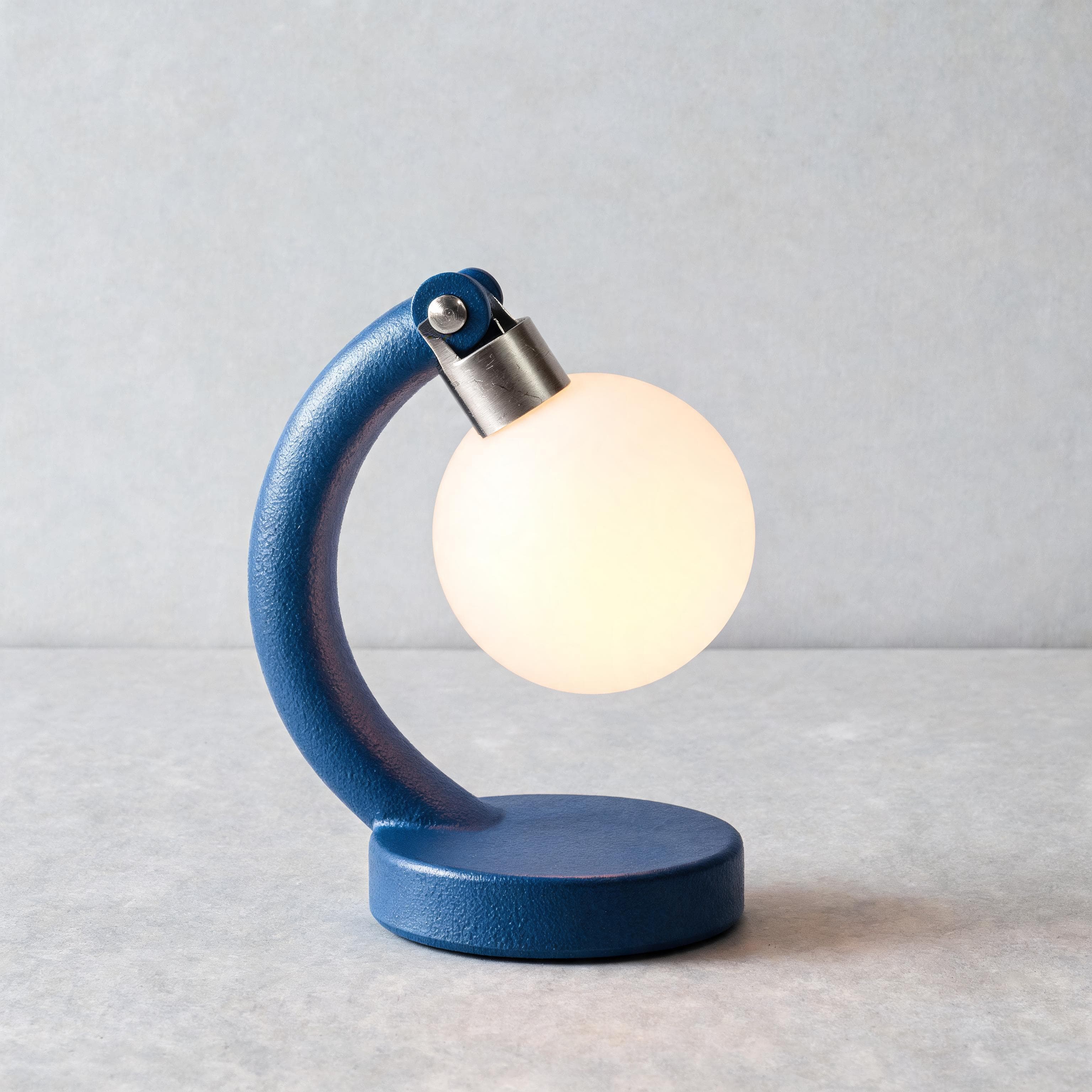 AI-generated · Kanvora official
Create a square studio product image, 1:1. One object only. Product concept: one compact arch-shaped desk lamp with a round base, a single brushed-aluminum hinge, and a circular warm-white diffuser. No second lamp, no extra hinge, no cable in frame. Material and finish: matte cobalt powder-coat on the arch and base with a fine orange-peel texture; brushed aluminum hinge with visible micro-scratches and a cool specular; opal glass diffuser glowing from within, not a painted disc. Camera view: three-quarter view at tabletop height, 50mm look, lamp filling most of the frame, generous breathing room at the top, focus on the hinge and the diffuser rim. Lighting: large softbox from upper left, a thin 2700K bounce from the diffuser onto the paper, restrained contact shadow attached to the round base, no floating shadow, no hard second key. Atmosphere: clean studio air, no haze, no steam, no dust motes that hide the silhouette. Surface and background: pale gray seamless paper, slight paper tooth, clean horizon. Must include: one hinge only, readable silhouette, warm diffuser, attached contact shadow, metal micro-scratches. Must avoid: logos, text, cables, hands, extra products, reflections that hide the silhouette, brand badges, second hinges.
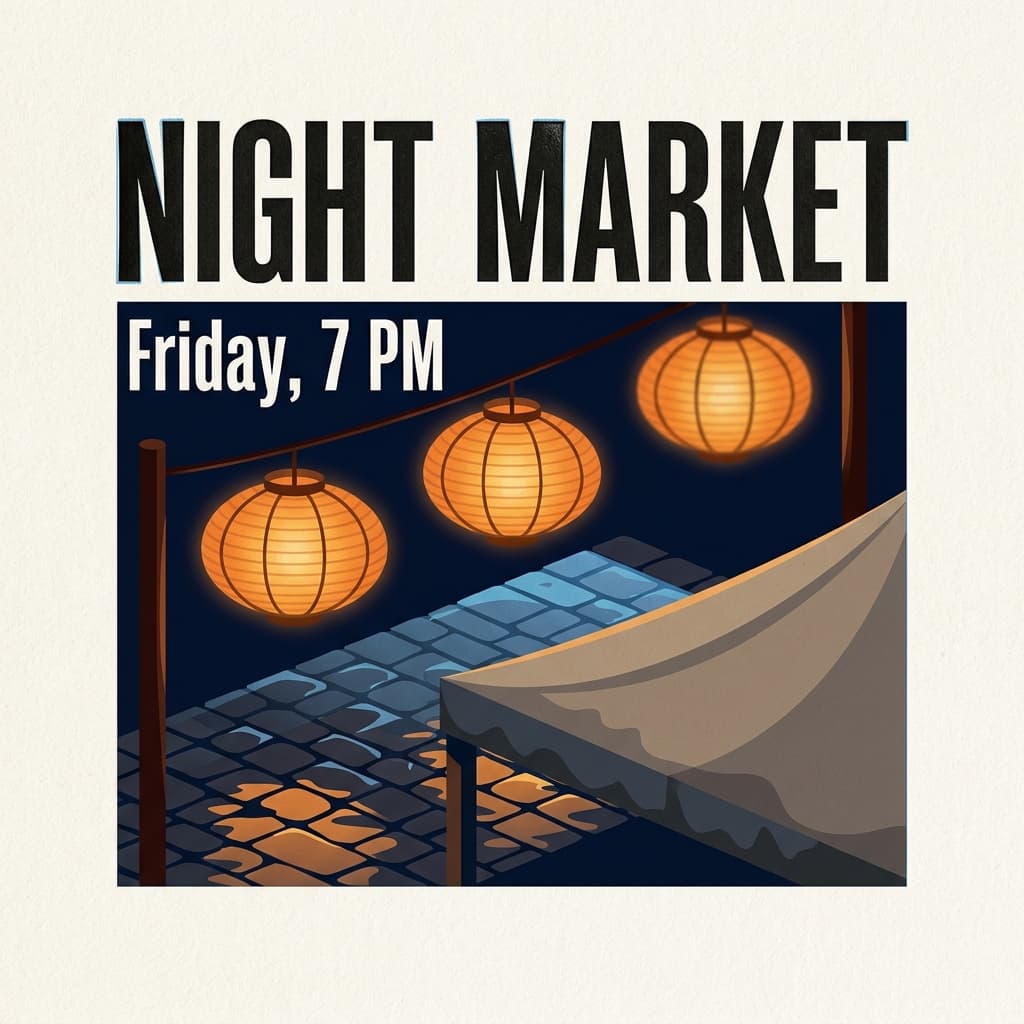 AI-generated · Kanvora official
Create a square event poster printed on warm cotton paper, 1:1. Headline text (exact): "NIGHT MARKET" Subhead text (exact): "Friday, 7 PM" Those two lines only, condensed gothic, carbon black, perfectly spelled, large headline filling the upper third. Visual subject: three oiled rice-paper lanterns on thin bamboo ribs hanging above an evening market street; wet dark-granite cobblestones; one canvas stall canopy edge in the lower third, rain-dark at the hem. Style: bold flat illustration with crisp geometric shapes, letterpress bite in the type, slight ink squash on the N and M, one faint registration hairline, visible cotton-paper tooth. Light: deep navy night sky, warm 2200K lantern glow pooling on the street, a thin cool skylight raking the wet stone, no extra neon signs. Atmosphere: a light rain sheen on the cobbles; no fog that hides the type; no people; no steam. Lens: straight-on poster camera, generous empty margins, type sharp, lanterns slightly softer. Must include: only those two exact lines of type, readable hierarchy, paper tooth, lanterns, wet stone. Must avoid: extra words, sponsor logos, watermarks, QR codes, people, tiny paragraph text, fake dates, signatures, stamps.
Use the diagram as a review guide
Reserve room for platform copy instead of asking the image model to typeset everything.
Start with the post job, not a generic mood
A social image needs one message, one focal subject, and a destination crop.
Decide where the image will appear and what the viewer should notice first. Keep captions, links, hashtags, and calls to action in the publishing workflow unless a short visual phrase is essential and can be proofread.
- Placement: square feed, portrait feed, or tall story-style frame.
- Message: one idea the image must communicate without a long caption embedded inside it.
- Focal subject: one person-free scene, object, illustration, or abstract form that can survive a mobile crop.
- Composition: define the focal position and where empty space should remain.
- Visual treatment: name observable light, color, material, and edge behavior.
- Exclusions: tiny text, platform UI, handles, unowned logos, watermarks, and video cues.
Write a post-image brief with room to crop
The prompt should define the visual asset, not impersonate the platform interface around it.
Ask for one focal subject and intentional negative space. Keep exact caption copy outside the generated raster whenever possible, because plausible-looking text can still be wrong.
Placement: [square feed | portrait feed | tall mobile frame]
Message: [one idea the visual should communicate]
Focal subject: [one subject]
Environment: [setting and background]
Composition: [subject position and reserved negative space]
Visual treatment: [light, color, material, style]
Must avoid: tiny text, handles, platform UI, logos, watermarks, extra subjectsCeramic workshop square post
This example demonstrates input structure only. Replace every detail with a brief you are allowed to use.
Placement: square feed image
Message: a quiet evening workshop is opening for registrations
Focal subject: one hand-built cobalt ceramic cup on a wood worktable
Environment: warm studio with blurred shelves and one task lamp
Composition: cup on lower right, generous calm space on upper left
Visual treatment: tactile editorial photograph with soft grain and precise warm shadows
Must avoid: people, text, logos, handles, platform UI, watermarks, extra cups
Match the ratio to the first placement
Square and tall placements need different focal positions and empty-space plans.
Kanvora provides five frames, but this page focuses on 1:1 and 9:16 because they create materially different social compositions. Confirm the actual destination crop before publishing.
| Need | Choose | Check before generating |
|---|---|---|
| Square feed image | 1:1 | Keep the subject away from edges and review at a small mobile size. |
| Tall story-style image | 9:16 | Reserve top and bottom room because destination UI may cover parts of the frame. |
| Portrait feed option | 3:4 | Use when the destination accepts portrait and the subject needs more vertical room than square. |
| Fast composition check | Nano Banana 2 1K, 4 credits | Use 1K to judge focal scale and negative space before a larger Nano Banana 2 run. |
| Larger stored still | Seedream 5.0 Lite 2K at 3 credits or Nano Banana 2 2K at 5 | Pick the model intentionally and still test the real destination crop. |
A ratio recommendation is not a current platform specification. Platform crop, overlay, and publishing requirements must be verified in the destination app.
Create and hand off one social still
The workflow ends with a destination preview, not with the generation queue alone.
Generate the visual layer, inspect every visible detail, and then complete exact copy and publishing controls in the right tool. Kanvora never posts on your behalf.
- 1
Lock the message and placement
Write one communication goal, select square or tall, and record where the focal subject and empty space belong.
ContinueA reviewer can explain the visual job in one sentence.Stop or reviseThe request is actually a carousel, reel, animation, or scheduling task. - 2
Build the visual-only prompt
Describe the subject, environment, composition, treatment, and exclusions without asking for platform chrome.
ContinueThe prompt can produce a useful image even with all caption copy handled later.Stop or reviseMove exact legal, handle, link, and small-type requirements to a layout tool. - 3
Choose model and frame
Use 1:1, 9:16, or another justified ratio, then confirm the displayed 3, 4, or 5-credit cost.
ContinueThe frame and budget match the first destination review.Stop or reviseThe destination crop or safe area is unknown. - 4
Sign in, submit once, and wait
Generate image gates guests at sign-in. After submission, follow the original queue through success, partial result, or definite failure.
ContinueOne stored still appears and the credit hold is settled.Stop or reviseDo not duplicate a QUEUED, RUNNING, or UNKNOWN request. - 5
Preview in the destination context
Check the image at mobile size, add exact copy elsewhere, and verify no important subject falls behind likely overlays.
ContinueThe stored still survives the crop and all visible details pass review.Stop or reviseRevise the composition or use a layout tool when the visual cannot carry the message safely.
Review a square post that looks good but crops poorly
A destination failure can exist even when the generated image itself is attractive.
The walkthrough treats mobile preview as evidence. It also preserves a no-action path when the current image already passes.
Ceramic workshop post rehearsal
Fix social-image failures at the right layer
Composition failures belong in the prompt; exact copy and publishing failures belong in another tool.
Separate generation from layout and distribution. This keeps each revision small and avoids claiming that Kanvora performs work it does not.
- Subject is cropped
- Move it inward, reduce its scale, and name the required clear edge space for the destination.
- Frame has no copy space
- Specify the empty region and remove background props that fill it.
- Embedded text is wrong
- Remove it from the generated still and add exact copy in a layout or publishing tool.
- Image reads poorly on mobile
- Simplify to one larger subject, stronger contrast, and fewer small details.
- Platform UI appears
- Exclude app chrome, handles, buttons, badges, and interface elements. Generate only the underlying image.
- Queue status is UNKNOWN
- Wait for the original request to settle. Do not spend credits on a duplicate status check.
Set a variation limit before generating
Social iteration can expand endlessly unless completion is defined in advance.
Choose a maximum number of composition rounds and keep exact copy changes outside the generation loop. The 20-credit signup grant supports several focused still-image attempts, depending on the selected model and size.
| Model setting | Credits per attempt | Use when |
|---|---|---|
| Seedream 5.0 Lite 2K | 3 | You want the lowest current credit cost and a 2K still. |
| Seedream 4.5 2K | 4 | You need Seedream 4.5 text-to-image at its fixed live output. |
| Nano Banana 2 1K | 4 | You want the Kanvora default and 1K is enough for the review round. |
| Nano Banana 2 2K | 5 | You need Nano Banana 2 at the larger live output setting. |
| Seedream 5.0 Pro 1K | 6 | You need the flagship Seedream text-to-image path at its fixed live size. |
Credits are charged per generation attempt, not per published post. Scheduling, native publishing, and campaign management are outside Kanvora and have no Kanvora credit charge.
Stop when the visual layer is complete
Do not ask image generation to replace layout, platform preview, or publishing controls.
A social still is complete when its focal subject, crop, treatment, and visible details pass. The next tool should add exact copy, test platform overlays, and publish.
- Generate the visual
- One text brief and one still frame can produce the underlying social image.
- Revise the composition
- The subject, focal scale, crop, or negative-space requirement failed.
- Wait for the current job
- The request is active or UNKNOWN and should not be duplicated.
- Use a layout tool
- Exact headline, handle, legal line, logo placement, or multi-size export is required.
- Use a publishing tool
- The still is approved and needs captioning, scheduling, native overlays, or posting.
- Keep the current proof
- The stored visual passes at destination size. Another variation adds cost without closing a gap.
Final review checklist
- The focal subject remains complete at the destination crop.
- The image communicates one visual idea at mobile size.
- No platform UI, unowned mark, or inaccurate small text appears.
- Exact copy and links are assigned to the correct publishing or layout tool.
- The stored file downloads before the post handoff.
Sources and review date
Model, product, queue, and credit facts can change and should be checked after the review date.
Kanvora's registry and public generator establish the live models, ratios, and credit prices. Upstream model documentation establishes model identity only. Social platform crop and overlay requirements are intentionally not claimed here because they must be verified in the destination at publication time.
- Google AI: Nano Banana 2 API image generation documentation.
- ByteDance: Seedream 5.0 Lite model page.
- fal: Seedream 5.0 Lite text-to-image endpoint and Seedream 4.5 text-to-image endpoint.
- Kanvora: Live generator, pricing, Acceptable Use Policy, Terms, and Privacy.
Last verified: August 20, 2026. Frozen PAP review due: November 20, 2026.
Create the visual. Keep publishing honest.
Open the public generator, choose a frame and model, and sign in only when you are ready to create a stored still for your real publishing workflow.